Breaking Changes in MiniKit v2:
  • SignatureTransfer is no longer supported. Please use Allowance Transfers documented below.
  • Standard ERC-20 approve() calls now work in mini apps. Approval will be automatically revoked after the transaction.
Allowance transfers are the recommended method for moving tokens in mini apps. World App automatically approves tokens to Permit2, so you can bundle the Permit2 approval and your contract call in a single sendTransaction for a better UX. Expiration should always be set to 0 as the approval will be consumed in the same transaction. Standard ERC-20 approve() also works if you prefer.
import { MiniKit } from "@worldcoin/minikit-js";
import { encodeFunctionData, parseEther } from "viem";

const PERMIT2 = "0x000000000022D473030F116dDEE9F6B43aC78BA3";

async function approveAndSwap(
  token: `0x${string}`,
  spender: `0x${string}`,
  amount: bigint,
) {
  const result = await MiniKit.sendTransaction({
    chainId: 480,
    transactions: [
      // 1. Approve spender via Permit2
      {
        to: PERMIT2,
        data: encodeFunctionData({
          abi: [
            {
              name: "approve", // You must use this method of Allowance Transfers
              type: "function",
              inputs: [
                { name: "token", type: "address" },
                { name: "spender", type: "address" },
                { name: "amount", type: "uint160" },
                { name: "expiration", type: "uint48" },
              ],
              outputs: [],
              stateMutability: "nonpayable",
            },
          ],
          functionName: "approve",
          args: [
            token,
            spender,
            amount,
            // Always set deadline to 0 as it will be consumed in the same transaction
           0,
          ],
        }),
      },
      // 2. Call your contract (which pulls tokens via permit2.transferFrom)
      {
        to: spender,
        data: encodeFunctionData({
          abi: [
            {
              name: "swap",
              type: "function",
              inputs: [{ name: "amount", type: "uint256" }],
              outputs: [],
              stateMutability: "nonpayable",
            },
          ],
          functionName: "swap",
          args: [amount],
        }),
      },
    ],
  });

  console.log(result.data.userOpHash);
}
World App automatically approves new ERC-20 tokens to the Permit2 contract. Your contract only needs to call permit2.transferFrom — the token-level approval is already in place.

Result

type SendTransactionResponse =
  | {
      executedWith: "minikit" | "wagmi";
      data: {
        userOpHash: string;
        status: "success";
        version: number;
        from: string;
        timestamp: string;
      };
    }
  | {
      executedWith: "fallback";
      data: unknown;
    };
If you are integrating through Wagmi, viem, or ethers with the World App EIP-1193 provider, the standard eth_sendTransaction call resolves to the MiniKit userOpHash, not a canonical transaction hash. Do not treat the returned value as a final transaction hash or pass it directly to waitForTransactionReceipt. If you need the final on-chain transaction hash, resolve the user operation status first.

Confirming the User Operation

The command resolves as soon as the user operation is submitted, so the first identifier you receive is userOpHash. You can either use the @worldcoin/minikit-react hook or poll the Developer Portal to check when the user operation is mined and get the final transaction_hash.
import { useUserOperationReceipt } from "@worldcoin/minikit-react";
import { createPublicClient, http } from "viem";
import { worldchain } from "viem/chains";

const client = createPublicClient({
  chain: worldchain,
  transport: http("https://worldchain-mainnet.g.alchemy.com/public"),
});

const { poll, isLoading, reset } = useUserOperationReceipt({ client });

const onClick = async () => {
  const result = await MiniKit.sendTransaction({...});
  const { receipt } = await poll(result.data.userOpHash);
  // receipt contains the final transaction receipt
};
See GET /api/v2/minikit/userop/ for the full endpoint response shape.

Error Codes

CodeMeaning
invalid_operationThe requested operation is not allowed
user_rejectedThe user rejected the request
input_errorThe payload is invalid
simulation_failedSimulation failed before execution
transaction_failedThe transaction failed after submission
generic_errorUnexpected failure
disallowed_operationThe requested operation is disallowed
validation_errorValidation failed before execution
invalid_contractThe contract is not allowed for your app
malicious_operationThe operation was flagged as malicious
daily_tx_limit_reachedDaily transaction limit reached
permitted_amount_exceeds_slippagePermit2 amount exceeds allowed slippage
permitted_amount_not_foundPermit2 amount could not be resolved

Fallback Behavior

By default we intend for mini apps to be useable outside of World App. Fallbacks generally will not be needed for this command and you should instead follow the migration path outlined.

Allowlisting Contracts and Tokens

Before your mini app can send transactions, you must allowlist the contracts and tokens it interacts with. Navigate to Developer Portal > Mini App > Permissions and add:
  • Permit2 Tokens — every ERC-20 token your app transfers via Permit2
  • Contract Entrypoints — every contract your app calls directly
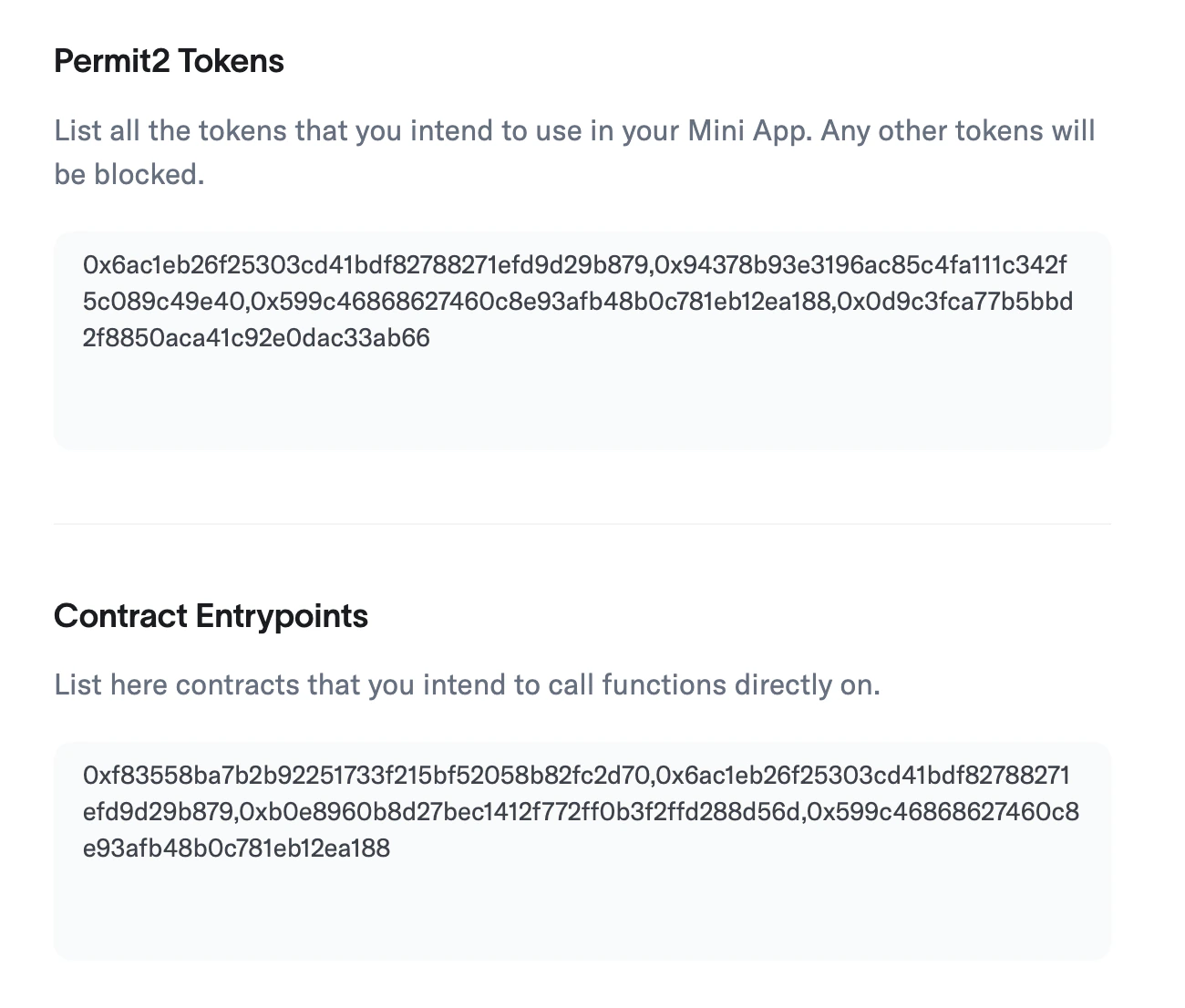
Developer Portal showing Permit2 token and contract entrypoint whitelisting

Developer Portal Whitelist

Transactions that touch non-whitelisted contracts or tokens will be blocked by the backend with an invalid_contract error.

Preview